Download The Capital App On iOS & Android
20 January 2017, 12:37 | Updated: 12 May 2021, 19:49
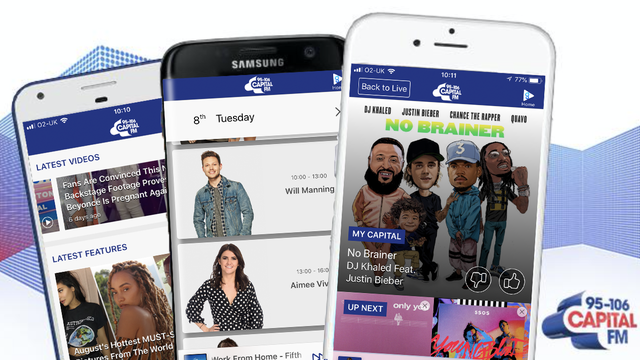
With the new Capital App powered by Global Player we've made it easier than ever to Get Into The Music.
With the Capital app you can also enjoy all of Global's other stations: Capital XTRA, Heart, LBC, Gold, Classic FM, Radio X and Smooth.
- Listen to Capital in HD quality, live and on the move.
- Check the playlist for music info and show schedules to see what's coming up next.
- Take control - My Capital, a world-first that allows you to skip songs on live radio - it's radio you control.*
- Catch up / listen again to all your favourite shows whenever you like.
- Download and listen to shows offline, perfect for listening while you're travelling.
- Subscribe to your favourite shows to automatically download them each day.
- Get the latest artist news and features.
So, whatever you're into - the latest hits, classic tracks, music for chilling out or even topical debate - Global's got you covered. And best of all, it's completely free and available worldwide. With the Global Player, you can:
- Hear the best shows from the biggest names in radio!
- Listen to all of Global's stations in HD audio.
- Get the latest news, videos and pictures from each of Global's stations with the best guests and most entertaining, informative content.
- Discover and download hundreds of award-winning audio shows in our new Podcasts section.
- If you want to relax or exercise, choose Playlists and we'll serve you the best music for your mood. You can also skip tracks in this section*, so now you're in control of what you hear.
Download the Capital app for iPhone and iPad here
Download the Capital app for Android here
* Currently only available in the UK.